Join PrimeGrid
Returning Participants
Community
Leader Boards
Results
Other
drummers-lowrise
|
Message boards :
Generalized Fermat Prime Search :
genefer 25.04.0
| Author |
Message |
|---|
|
|
|
A new version of genefer is available: 25.04.0. You can download Windows and Linux binaries here.
Source code repository is GitHub::genefer22.
This new version is a major improvement for GeForce 40 and 50 series.
exponent throughput
GFN-16 +10-20%
GFN-17 +30%
GFN-18 +20-50%
GFN-19/20/21 +30-50%
GFN-22 +25% (RTX 4060)
GFN-23 +10% (RTX 4060, other DYFL tests are in progress)
Thanks to tng for testing and validating genefer 25.04.
An improvement is also expected for other GPU, but it was not tested. The architecture of GeForce 20/30 is close to GeForce 40. My AMD iGPU (GCN 5.1) enjoys the new version and according to AMD documentation, the new implemention should be suitable for RDNA. No idea for Intel GPU.
Those who are familiar with Boinc tricks can test this version using an app_info.xml file.
With genefer 25.04, RTX 4060 will be able to test more than 50 GFN-20 candidates during the 5-day PrimeGrid's 20th Birthday Challenge and RTX 4090 about 280 candidates. | |
|
 EA6LE EA6LE  
Send message
Joined: 4 Feb 21
Posts: 79
ID: 1345478
Credit: 22,332,298,643
RAC: 21,110,940
                                   
|
|
Please share the app_info.xml settings to test the new version.
Thank you. | |
|
tng Send message
Joined: 29 Aug 10
Posts: 646
ID: 66603
Credit: 78,747,384,770
RAC: 57,017,933
                                                               
|
Please share the app_info.xml settings to test the new version.
Thank you.
Here's what I am using. Note that it does not allow for running anything other than genefer on GPU.
<app_info>
<app>
<name>genefer16</name>
<user_friendly_name>GFN-16</user_friendly_name>
<fraction_done_exact/>
<max_concurrent>1</max_concurrent>
</app>
<app>
<name>genefer17mega</name>
<user_friendly_name>GFN-17</user_friendly_name>
<fraction_done_exact/>
<max_concurrent>1</max_concurrent>
</app>
<app>
<name>genefer18</name>
<user_friendly_name>GFN-18</user_friendly_name>
<fraction_done_exact/>
<max_concurrent>1</max_concurrent>
</app>
<app>
<name>genefer19</name>
<user_friendly_name>GFN-19</user_friendly_name>
<fraction_done_exact/>
<max_concurrent>1</max_concurrent>
</app>
<app>
<name>genefer20</name>
<user_friendly_name>GFN-20</user_friendly_name>
<fraction_done_exact/>
<max_concurrent>1</max_concurrent>
</app>
<app>
<name>genefer</name>
<user_friendly_name>GFN-21</user_friendly_name>
<fraction_done_exact/>
<max_concurrent>1</max_concurrent>
</app>
<app>
<name>genefer_extreme</name>
<user_friendly_name>Do You Feel Lucky?</user_friendly_name>
<fraction_done_exact/>
<max_concurrent>1</max_concurrent>
</app>
<file_info>
<name>geneferg.exe</name>
<executable/>
</file_info>
<file_info>
<name>genefer.exe</name>
<executable/>
</file_info>
<app_version>
<app_name>genefer16</app_name>
<cmdline></cmdline>
<avg_ncpus>1</avg_ncpus>
<version_num>405</version_num>
<api_version>7.24.3</api_version>
<file_ref>
<file_name>geneferg.exe</file_name>
<main_program/>
</file_ref>
<plan_class>OCLcudaGFN</plan_class>
<coproc>
<type>CUDA</type>
<count>1.000000</count>
</coproc>
<avg_ncpus>0.1</avg_ncpus>
<max_ncpus>0.1</max_ncpus>
</app_version>
<app_version>
<app_name>genefer17mega</app_name>
<cmdline></cmdline>
<avg_ncpus>1</avg_ncpus>
<version_num>405</version_num>
<api_version>7.24.3</api_version>
<file_ref>
<file_name>geneferg.exe</file_name>
<main_program/>
</file_ref>
<plan_class>OCLcudaGFN</plan_class>
<coproc>
<type>CUDA</type>
<count>1.000000</count>
</coproc>
<avg_ncpus>0.1</avg_ncpus>
<max_ncpus>0.1</max_ncpus>
</app_version>
<app_version>
<app_name>genefer18</app_name>
<cmdline></cmdline>
<avg_ncpus>1</avg_ncpus>
<version_num>405</version_num>
<api_version>7.24.3</api_version>
<file_ref>
<file_name>geneferg.exe</file_name>
<main_program/>
</file_ref>
<plan_class>OCLcudaGFN</plan_class>
<coproc>
<type>CUDA</type>
<count>1.000000</count>
</coproc>
<avg_ncpus>0.1</avg_ncpus>
<max_ncpus>0.1</max_ncpus>
</app_version>
<app_version>
<app_name>genefer19</app_name>
<cmdline></cmdline>
<avg_ncpus>1</avg_ncpus>
<version_num>405</version_num>
<api_version>7.24.3</api_version>
<file_ref>
<file_name>geneferg.exe</file_name>
<main_program/>
</file_ref>
<plan_class>OCLcudaGFN</plan_class>
<coproc>
<type>CUDA</type>
<count>1.000000</count>
</coproc>
<avg_ncpus>0.1</avg_ncpus>
<max_ncpus>0.1</max_ncpus>
</app_version>
<app_version>
<app_name>genefer20</app_name>
<cmdline></cmdline>
<avg_ncpus>1</avg_ncpus>
<version_num>405</version_num>
<api_version>7.24.3</api_version>
<file_ref>
<file_name>geneferg.exe</file_name>
<main_program/>
</file_ref>
<plan_class>OCLcudaGFN</plan_class>
<coproc>
<type>CUDA</type>
<count>1.000000</count>
</coproc>
<avg_ncpus>0.1</avg_ncpus>
<max_ncpus>0.1</max_ncpus>
</app_version>
<app_version>
<app_name>genefer</app_name>
<cmdline></cmdline>
<avg_ncpus>1</avg_ncpus>
<version_num>405</version_num>
<api_version>7.24.3</api_version>
<file_ref>
<file_name>geneferg.exe</file_name>
<main_program/>
</file_ref>
<plan_class>OCLcudaGFN</plan_class>
<coproc>
<type>CUDA</type>
<count>1.000000</count>
</coproc>
<avg_ncpus>0.1</avg_ncpus>
<max_ncpus>0.1</max_ncpus>
</app_version>
<app_version>
<app_name>genefer_extreme</app_name>
<cmdline></cmdline>
<avg_ncpus>1</avg_ncpus>
<version_num>405</version_num>
<api_version>7.24.3</api_version>
<file_ref>
<file_name>geneferg.exe</file_name>
<main_program/>
</file_ref>
<plan_class>OCLcudaGFN</plan_class>
<coproc>
<type>CUDA</type>
<count>1.000000</count>
</coproc>
<avg_ncpus>0.1</avg_ncpus>
<max_ncpus>0.1</max_ncpus>
</app_version>
</app_info>
____________
 | |
|
mackerel Volunteer tester

Send message
Joined: 2 Oct 08
Posts: 2979
ID: 29980
Credit: 789,025,352
RAC: 50,968
                                 
|
|
Always nice to see speedups.
Some quick testing on Windows systems. NV GPUs on driver 576.02. Forgot to note what driver the A380 was running but it should be current. GPUs at stock settings, but laptop was set to "quiet mode" whatever that does. I have seen it reduce maximum CPU performance but not GPU.
I reused a unit I got earlier today for this test.
-p -n 20 -b 4140786
I observed the estimated time remaining for a several refreshes and noted a typical value. Since these are short runs, the GPU doesn't really get hot and slow down, so there will be differences when running continuously.
25.04.0 vs 24.04.01
3070 Laptop >70% faster
4070 FE >60% faster
5070 Ti ~44% faster
A380 ~45% faster | |
|
|
|
|
Amazing improvements Yves, thanks for all that you do!
____________
 | |
|
|
|
|
Nice improvements, Yves! Can you summarize the changes that led to such a boost?
____________
Eating more cheese on Thursdays. | |
|
|
|
Nice improvements, Yves! Can you summarize the changes that led to such a boost?
The story of this version is amazing. In the beginning, there was a mistake. I found a new algorithm with fewer mathematical operations and I implemented it: it was a bit faster on old GPU but clearly slower on RTX 40. By searching for the reason, I found that the number of memory transactions was higher. Even if the data size is smaller than L2 cache size, the new algorithm was slower.
Then I implemented an algorithm using some vectors of four integers (rather than one or two integers) and it is remarkably faster.
Finally, the number of mathematical operations (computational complexity) of the new version is identical to the previous one. The difference is how memory is read and written.
The fact that L2 (or L3 for AMD) bandwidth is the bottleneck is not surprising: the bus is shared and there are thousands of cores. But according to Nvidia optimization guide, the number of transactions is minimal if data are adjacent (coalescing), a requirement that was satisfied by genefer. The size of the data (4, 8 or 16 bytes) is not a condition which is supposed to change the speed. In fact, 16 bytes is clearly a requirement for the recent GPU but Nvidia does not indicate it. Note that 16 bytes is quite logical because the basic element of 3D rendering is a vector of four floats.
Nvidia indicates that the GPU memory controller can issue requests to memory in granularities up to 128 bytes. Considering warp size, 128/32 = 4 bytes. An assumption is that the memory controller can issue requests to L2 cache up to 512 bytes.
It is a shame that the internal architecture of GPU is not documented. Due to competition, too much information could help other companies is the argument put forward. The fact the reverse engineering is needed to develop hi-end applications is disconcerting. | |
|
Honza Volunteer moderator
Volunteer tester
Project scientist
Send message
Joined: 15 Aug 05
Posts: 2082
ID: 352
Credit: 9,648,822,826
RAC: 2,475,311
                                     
|
|
Amazing story and amazing speed improvement.
Nice speed-up with GFN18 on RTX 4070 Super - it can do 11 tests instead of 8,5 per hour.
Now, each GFN18 test generates 128x1MB of checkpoint files, practically 400kB/sec of constant disk writes, over 35GB per day, ~1TB per month.
This is some significant amount of SSD writes.
Can we happy option to keep checkpoints in memory?
There is no one-size-fits-all but for hing-end GPUs, having some small and mid-range GFN checkpoints in memory makes sense I think.
____________
My stats | |
|
Michael Goetz Volunteer moderator
Project administrator

Send message
Joined: 21 Jan 10
Posts: 14697
ID: 53948
Credit: 1,042,938,327
RAC: 199
                            
|
Amazing story and amazing speed improvement.
Nice speed-up with GFN18 on RTX 4070 Super - it can do 11 tests instead of 8,5 per hour.
Now, each GFN18 test generates 128x1MB of checkpoint files, practically 400kB/sec of constant disk writes, over 35GB per day, ~1TB per month.
This is some significant amount of SSD writes.
Can we happy option to keep checkpoints in memory?
There is no one-size-fits-all but for hing-end GPUs, having some small and mid-range GFN checkpoints in memory makes sense I think.
Mythbuster time. :)
TL;dr: Don't worry about SSD write limits.
Yes, SSD's have a write limit.
Unless you're actively trying to break the SSD, it's unlikely you'll hit the limit. PrimeGrid's servers, which do nothing but continuous database writes all day (MUCH more than all the Genefers disk writes of ALL of the users combined) is running off of SSDs. I'm sure they'll outlast the servers themselves.
Here's why the write limit isn't that important:
Although there is a write limit, it's NOT a fixed number of Terabytes. It's a limit on the number of writes to a single location. It's about 100,000 writes PER BIT. I have a 4 TB SSD in this computer. Every sector can be written 100,000 times. Multiply that by 4 TB, and I could, theoretically (more on this later), write 400 petabytes to the SSD before exceeding the limit on any bit.
So writing 1 terabyte per month to the SSD gives me 100,000 months of running Genefer. That's over 8 thousand years.
Now, the obvious "flaw" in my logic is that some sectors on the disk are going to get written to a lot, while others will hardly ever be written too. This would lead to encountering actual write limits far sooner than my estimate of 8 millennia. But this has a solution, which is built into even the oldest SSDs. The device itself remaps the the logical sectors to different physical sectors when sectors start getting near their write limit. So the actual lifetime is way, way up there such that must uses for SSDs will never have to worry about the write limits.
About the only application where I would be concerned is a CCTV storage system which is continuously writing large amounts of data to the SSD. (Far beyond what our database does.)
There's no need for Yves to change the way Genefer works.
____________
My lucky number is 75898524288+1 | |
|
Honza Volunteer moderator
Volunteer tester
Project scientist
Send message
Joined: 15 Aug 05
Posts: 2082
ID: 352
Credit: 9,648,822,826
RAC: 2,475,311
|
Mythbuster time. :)
TL;dr: Don't worry about SSD write limits.
Yes, 500GB SSD in office box will outlive computer several times over and No, it will not live 100k re-writes.
I already have one 4TB SSD worn out and had to replace it with 8TB version ;-)
My point was that since GFN already has hard-coded checkpointing for n=16 in memory, I got the impression that doing it using option for different n values would be easy to implement.
I don't see much downside there and closer to win-win situation.
____________
My stats | |
|
|
|
|
(win10/11) Just download it and put it in the project directory?
Will FP64 be used on GPU?
____________
| |
|
|
|
My point was that since GFN already has hard-coded checkpointing for n=16 in memory, I got the impression that doing it using option for different n values would be easy to implement.
I don't see much downside there and closer to win-win situation.
I just need to replace "(n <= 17)" by "(n <= 18)", it won't be too hard :-)
Another point is the speed. The RTX 4090 tests a GFN-18 in 3 minutes: the computation is stopped, data are copied to main memory and then to disk each 1.5 seconds.
Allocating 100MB of GPU memory is certainly a better solution.
What was true for GFN-17 in 2022, is true for GFN-18 in 2025. | |
|
EA6LE
Send message
Joined: 4 Feb 21
Posts: 79
ID: 1345478
Credit: 22,332,298,643
RAC: 21,110,940
|
|
I created the app_info.xml file in the project directory and extract the new exe files in the same directory. restarted the boinc application and is still using the default app. Is there another setting I have to make to enable the app_info.xml?
Thank you.
| |
|
Michael Goetz Volunteer moderator
Project administrator
Send message
Joined: 21 Jan 10
Posts: 14697
ID: 53948
Credit: 1,042,938,327
RAC: 199
|
My point was that since GFN already has hard-coded checkpointing for n=16 in memory, I got the impression that doing it using option for different n values would be easy to implement.
I don't see much downside there and closer to win-win situation.
I just need to replace "(n <= 17)" by "(n <= 18)", it won't be too hard :-)
Another point is the speed. The RTX 4090 tests a GFN-18 in 3 minutes: the computation is stopped, data are copied to main memory and then to disk each 1.5 seconds.
Allocating 100MB of GPU memory is certainly a better solution.
What was true for GFN-17 in 2022, is true for GFN-18 in 2025.
If the calculation is paused for any reason, e.g., "suspend when computer is in use" which means touching the mouse, anything stored in video ram is lost. The calculation must be restarted from the last boinc checkpoint. If you store information in video ram, it has to be information that can be recreated, correct?
____________
My lucky number is 75898524288+1 | |
|
tng Send message
Joined: 29 Aug 10
Posts: 646
ID: 66603
Credit: 78,747,384,770
RAC: 57,017,933
|
I created the app_info.xml file in the project directory and extract the new exe files in the same directory. restarted the boinc application and is still using the default app. Is there another setting I have to make to enable the app_info.xml?
Thank you.
Shouldn't be. That's what I did. Does your event log include a message indicating that the app_info was found?
____________
| |
|
Michael Goetz Volunteer moderator
Project administrator
Send message
Joined: 21 Jan 10
Posts: 14697
ID: 53948
Credit: 1,042,938,327
RAC: 199
|
My point was that since GFN already has hard-coded checkpointing for n=16 in memory, I got the impression that doing it using option for different n values would be easy to implement.
I don't see much downside there and closer to win-win situation.
I just need to replace "(n <= 17)" by "(n <= 18)", it won't be too hard :-)
Another point is the speed. The RTX 4090 tests a GFN-18 in 3 minutes: the computation is stopped, data are copied to main memory and then to disk each 1.5 seconds.
Allocating 100MB of GPU memory is certainly a better solution.
What was true for GFN-17 in 2022, is true for GFN-18 in 2025.
If the calculation is paused for any reason, e.g., "suspend when computer is in use" which means touching the mouse, anything stored in video ram is lost. The calculation must be restarted from the last boinc checkpoint. If you store information in video ram, it has to be information that can be recreated, correct?
I think there's a workaround for this that will work for both fast and slow GPUs, but the checkpoint/restart logic is going to get more complicated, and you'll be trading off run-time speed for restarting much futher back. And it will probably fail spectactularly if someone has BOINC set to frequently pause and resume the app. "Run 50% of the time" might be a disaster.
____________
My lucky number is 75898524288+1 | |
|
|
|
|
I see a 25% improvement (GFN20) on Radeon 7900 XTX with fixed clocks. However, the memory bandwidth (-5%) and power consumption (-40W) are lower, so the GPU can sustain +100MHz higher clocks. Nice! | |
|
EA6LE
Send message
Joined: 4 Feb 21
Posts: 79
ID: 1345478
Credit: 22,332,298,643
RAC: 21,110,940
|
Shouldn't be. That's what I did. Does your event log include a message indicating that the app_info was found?
Got it working, needed to kill boinc client and restart it. reloading config files is not working. | |
|
Honza Volunteer moderator
Volunteer tester
Project scientist
Send message
Joined: 15 Aug 05
Posts: 2082
ID: 352
Credit: 9,648,822,826
RAC: 2,475,311
|
I just need to replace "(n <= 17)" by "(n <= 18)", it won't be too hard :-)
Another point is the speed. The RTX 4090 tests a GFN-18 in 3 minutes: the computation is stopped, data are copied to main memory and then to disk each 1.5 seconds.
Allocating 100MB of GPU memory is certainly a better solution.
What was true for GFN-17 in 2022, is true for GFN-18 in 2025.
Yes, this is what I ment.
Automatic logic like "if checkpointing is more frequent than xx minutes, use memory" also came to my mind...but hey, how much is too frequent?
Or say 10 minutes and have an option to override...?
Fox example, GFN-19 takes me about 15 minutes and I'm happy doing it in memory and perhaps loose one task progress a day (and do couple more pay day while saving tones of SSD writes).
"someone has BOINC set to frequently pause and resume the app" is basically recipe for disaster or at least spectacular inefficiency.
Only keep in memory will be of some use.
____________
My stats | |
|
|
|
If the calculation is paused for any reason, e.g., "suspend when computer is in use" which means touching the mouse, anything stored in video ram is lost. The calculation must be restarted from the last boinc checkpoint. If you store information in video ram, it has to be information that can be recreated, correct?
There is no difference for the user.
There are the 128 checkpoints for the proof generation and the Boinc checkpoint for being able to resume from this point.
If the 128 checkpoints are saved in GPU memory, this area is saved to the Boinc checkpoint file when the application is suspended or a Boinc checkpoint request is received.
For GFN-18, we have 128 1MB files + one 6MB file or a single 134MB file if checkpointing in memory is enable.
If "Tasks checkpoint to disk at most every" > GFN-18 runtime, the 134MB file is never written to the disk.
GFN-17 has been checkpointing in GPU memory for three years seamlessly. The test of a GFN-18 on RTX 4060 is about as fast as a GFN-17 on GTX 1080. It seems right to translate the feature to take account of GPU progress. | |
|
valterc Volunteer tester
Send message
Joined: 30 May 07
Posts: 125
ID: 8810
Credit: 34,511,855,211
RAC: 6,542,095
                           
|
|
Benchmark results for Nvidia L40S
geneferg version 25.04.0 (linux x64, gcc-7.5.0, boinc-8.2.0)
Copyright (c) 2022, Yves Gallot
genefer is free source code, under the MIT license.
Command line: '-h'
Running on device 'NVIDIA L40S', vendor 'NVIDIA Corporation', version 'OpenCL 3.0 CUDA', driver '570.86.15'.
460000000^{2^16} + 1: 00:00:31, 0.0168 ms/bit, data size: 1.12 MB.
350000000^{2^17} + 1: 00:01:09, 0.0187 ms/bit, data size: 2.25 MB.
60000000^{2^18} + 1: 00:02:57, 0.0262 ms/bit, data size: 4.5 MB.
15000000^{2^19} + 1: 00:07:59, 0.0384 ms/bit, data size: 9 MB.
4000000^{2^20} + 1: 00:26:00, 0.0679 ms/bit, data size: 18 MB.
2500000^{2^21} + 1: 01:42:40, 0.138 ms/bit, data size: 36 MB.
400000^{2^22} + 1: 05:33:00, 0.256 ms/bit, data size: 48 MB.
100000^{2^23} + 1: 22:41:49, 0.586 ms/bit, data size: 96 MB.
-----------------------------------------------------------------------------------------------------------
geneferg version 24.04.1 (linux x64, gcc-7.5.0, boinc-7.24.3)
Copyright (c) 2022, Yves Gallot
genefer is free source code, under the MIT license.
Command line: '-h'
Running on device 'NVIDIA L40S', vendor 'NVIDIA Corporation', version 'OpenCL 3.0 CUDA', driver '570.86.15'.
400000000^{2^16} + 1: 00:00:31, 0.0169 ms/bit, data size: 2.25 MB.
250000000^{2^17} + 1: 00:01:22, 0.0227 ms/bit, data size: 4.5 MB.
40000000^{2^18} + 1: 00:03:52, 0.0351 ms/bit, data size: 9 MB.
9000000^{2^19} + 1: 00:12:26, 0.0616 ms/bit, data size: 18 MB.
3500000^{2^20} + 1: 00:41:39, 0.11 ms/bit, data size: 36 MB.
1500000^{2^21} + 1: 01:32:16, 0.129 ms/bit, data size: 48 MB.
400000^{2^22} + 1: 05:27:55, 0.252 ms/bit, data size: 96 MB.
500000^{2^23} + 1: 31:43:59, 0.719 ms/bit, data size: 192 MB.
| |
|
|
|
Benchmark results for Nvidia L40S
Note that the candidates were updated with current PrimeGrid limits. Then ms/bit can be compared but not the computation times.
GFN-21 tasks became slower for b > 2,019,124 (during Willy's Challenge) [3-prime NTT vs 2-prime NTT]. Then "01:42:40 vs 01:32:16" means that GFN-21 is now about as fast as it was before the "b > 2,019,124" drop.
Because of variable clock speeds, this benchmark is not accurate. | |
|
EA6LE
Send message
Joined: 4 Feb 21
Posts: 79
ID: 1345478
Credit: 22,332,298,643
RAC: 21,110,940
|
|
I have observed approximately a 35% improvement on one of my RTX 4080 graphics cards for GFN-21. This is a significant enhancement.
When will the new application be rolled out on BOINC?
Thank you! | |
|
|
|
I see a 25% improvement (GFN20) on Radeon 7900 XTX with fixed clocks. However, the memory bandwidth (-5%) and power consumption (-40W) are lower, so the GPU can sustain +100MHz higher clocks. Nice!
I am pleased to see that RDNA likes the new implementation!
Radeon 7900 XTX is made of one Graphics Compute Die and six Memory Cache Dies (see Navi32). According to the size of MCD, their consumption should be a substantial part of global consumption. With the new algorithm, it should be lower. If improvement is 25% then consumption of GCD is +25%. The consumption of MCD should be much lower.
Since the L3 cache size is 96 MB, the memory bandwidth is expected to be close to zero...? | |
|
|
|
|
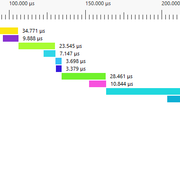
> Since the L3 cache size is 96 MB, the memory bandwidth is expected to be close to zero...?
Memory Controller Load stays at zero only up to GFN18. I'm still unsure if OpenCL can leverage the infinity (L3) cache, there's barely any documentation on that...
Anyway, I uploaded some profiles for comparison
https://github.com/ahorek/geneferprofiles
You can open it with Radeon Dev tools and check the assembly and timings
https://gpuopen.com/tools/
geneferg -p -n 20 -b 4140786
  | |
|
|
|
Can we happy option to keep checkpoints in memory?
I have just tried it and it is a bit more complicated than expected.
First, the needed GPU memory size is larger than what I wrote: 390MB for GFN-18.
Because a Boinc checkpoint is a copy of this memory, its size is now 390MB. Without checkpoints in GPU memory, its size is 6MB.
On the one hand, we have 128*1MB + 6MB for each Boinc checkpoint, on the other hand 0MB + 390MB for each Boinc checkpoint.
No improvement is noticed with it and today it fails if a Boinc checkpoint is written to the disk because 390MB is larger than the limit allocated by Boinc/PrimeGrid (EXIT_DISK_LIMIT_EXCEEDED).
I will implement it but not in this version of genefer. The Boinc checkpoint format must be modified such that its size is minimal.
And even with this optimization, it will save your amount of SSD writes but someone running GFN-18 on its iGPU with the default settings (checkpoint to disk every 600 seconds) will increase its amount of SSD writes because the 1MB checkpoints are rewritten each time the Boinc checkpoint is saved.
It must be designed, it is not a minor change.
Note that you can set "Compress contents to save disk space" to Boinc directory. It is fast and should halve the amount of SSD writes. | |
|
|
|
|
Titan X (Maxwell) 12GB from 2136 seconds to 2064 seconds, an improvement of 3.4%. GFN-18 win11. with i9 11900KF on board. 🥳
____________
| |
|
|
|
I have observed approximately a 35% improvement on one of my RTX 4080 graphics cards for GFN-21. This is a significant enhancement.
When will the new application be rolled out on BOINC?
Thank you!
My work is now complete, I'll pass it on to PrimeGrid admins for deploying it.
A new record (from tng): 98802^{2^23} + 1: 20:37:51. This is not bad for a 41,899,132-digit number! :-) | |
|
compositeVolunteer tester
Send message
Joined: 16 Feb 10
Posts: 1282
ID: 55391
Credit: 2,332,404,537
RAC: 20,284
             
|
|
Works for me.
On a 3080 Ti, GFN-21 improves from 23,612 seconds to 18,383 seconds => 28.4% faster.
For the benefit of people who want to try compiling genefer on Debian Linux,
building genefer needs BOINC client build artifacts. So,
Assuming BOINC is already installed from the Debian package repository,
apt-get build-dep -y boinc
git clone https://github.com/BOINC/boinc.git
pushd boinc
# checkout the tag for the installed BOINC version
git tag | grep $(boinc --version | cut -d ' ' -f 1) | xargs git checkout
./auto_setup
./configure --disable_server
make
# do not install, we just want this stuff for compiling and linking genefer
popd
and then build genefer
apt-get install -y boinc-dev libgmp-dev
git clone https://github.com/galloty/genefer22.git
pushd genefer22/genefer
make -f Makefile_linux64
popd
On success the programs are ready to be copied from genefer22/bin/ to the PrimeGrid project subdirectory in BOINC.
On Linux the binary files do not have ".exe" filename extensions, so if you use the app_info.xml file in this message thread, you must either rename the binaries from genefer22/bin as you copy them to the primegrid subdirectory, or alteratively edit app_info.xml to remove the ".exe" everywhere in it. | |
|
RafaelVolunteer tester

Send message
Joined: 22 Oct 14
Posts: 1000
ID: 370496
Credit: 1,059,450,706
RAC: 641,852
         
|
My work is now complete, I'll pass it on to PrimeGrid admins for deploying it.
A new record (from tng): 98802^{2^23} + 1: 20:37:51. This is not bad for a 41,899,132-digit number! :-)
Tested on my 4060, and boy does it go FAST. I took a 21 candidate I was running and manually ran it on both versions, it went from 15h02m to 10h26m, or about a 31% speedup. That's nuts.
While we're at it, any news on the revamped app that tests multiple candidates at once to make low GFN great on powerful gpus? | |
|
DeleteNull Volunteer tester

Send message
Joined: 6 Apr 06
Posts: 292
ID: 2663
Credit: 19,346,669,975
RAC: 1,728,639
                   
|
|
4080 with GFN20: 3030 before, 2113 after.
5070 with GFN20: 4325 before, 3193 after.
____________
DeleteNull | |
|
|
|
My work is now complete, I'll pass it on to PrimeGrid admins for deploying it.
Any update on this? | |
|
Michael Goetz Volunteer moderator
Project administrator
Send message
Joined: 21 Jan 10
Posts: 14697
ID: 53948
Credit: 1,042,938,327
RAC: 199
|
My work is now complete, I'll pass it on to PrimeGrid admins for deploying it.
Any update on this?
There's discussions going on behind the scenes.
____________
My lucky number is 75898524288+1 | |
|
AlHo Send message
Joined: 13 Oct 12
Posts: 115
ID: 175225
Credit: 1,041,086,264
RAC: 1,387,301
        
|
|
Thank you so much Yves for developing this!
Looks like it has been released now - thanks admins :)
| |
|
|
|
|
Wow this is a great improvement in performance, well done Yves.
Example:
35 % faster on AMD 9070 XT doing GFN-20
| |
|
|
|
|
Good work, now we will be faster.
____________
https://es.libretranslate.com/ | |
|
|
|
|
This brought my 3070 from ~30 GFN19/day to ~45 and my 4070Super from ~70 GFN19/day to ~110. Great results!
____________
| |
|
|
|
|
If someone is able to generate the OpenCL binary for Apple M (from GitHub::genefer22 repository), he is welcome.
I don't know if linking to Boinc 8.2 could help to fix Apple M issue with Boinc 8 client.
Windows and Linux applications are now linked to Boinc 8.2 libraries. | |
|
rogueVolunteer developer

Send message
Joined: 8 Sep 07
Posts: 1292
ID: 12001
Credit: 18,565,548
RAC: 0

|
If someone is able to generate the OpenCL binary for Apple M (from GitHub::genefer22 repository), he is welcome.
I don't know if linking to Boinc 8.2 could help to fix Apple M issue with Boinc 8 client.
Windows and Linux applications are now linked to Boinc 8.2 libraries.
I will see what I can do, if someone doesn't beat me to it. | |
|
|
|
|
I can build it, but I can't test it... https://we.tl/t-97D7YXyfgc | |
|
Crun-chi Volunteer tester

Send message
Joined: 25 Nov 09
Posts: 3372
ID: 50683
Credit: 227,755,090
RAC: 0
               
|
|
I dont know if it is just on my computer ( since nobody else complain about this)
Nvidia drivers 535.216.03
Linux : Mx Linux
Nvidia 3060 Ti
Kernel 6.14.4-1-liquorix-amd64 #1 ZEN SMP PREEMPT_DYNAMIC liquorix 6.14-6~mx23ahs (2025-04-26)
I am complain about 100% usage of one core. Old libsleep fix works with previous genefer release, but not with this one.
Does anybody else have similar problem?
____________
2*836^798431+1 CRUS PRIME
92*10^1585996-1 NEAR-REPDIGIT PRIME :) :) :)
2022202116^131072+1 GFN
Proud member of team Aggie The Pew. Go Aggie! | |
|
|
|
I am complain about 100% usage of one core. Old libsleep fix works with previous genefer release, but not with this one.
I see in this thread
Ryzen 7 3800XT + RTX 3050
task libsleep CPU
GFN16 50 41%
GFN17Mega 50 25%
GFN18 50 22%
GFN19 50 8%
If RTX 3060 Ti and the new version of genefer is four times as fast as RTX 3050 and the previous version, CPU usage is about 100% for GFN-16 and 17. | |
|
Crun-chi Volunteer tester
Send message
Joined: 25 Nov 09
Posts: 3372
ID: 50683
Credit: 227,755,090
RAC: 0
|
|
I assume that under Windows usage is not 100% of one core
____________
2*836^798431+1 CRUS PRIME
92*10^1585996-1 NEAR-REPDIGIT PRIME :) :) :)
2022202116^131072+1 GFN
Proud member of team Aggie The Pew. Go Aggie! | |
|
|
|
I assume that under Windows usage is not 100% of one core
GFN-17: 90% of one core (RTX 4060, Windows 11). | |
|
Crun-chi Volunteer tester
Send message
Joined: 25 Nov 09
Posts: 3372
ID: 50683
Credit: 227,755,090
RAC: 0
|
|
So, for new app, it is normal
____________
2*836^798431+1 CRUS PRIME
92*10^1585996-1 NEAR-REPDIGIT PRIME :) :) :)
2022202116^131072+1 GFN
Proud member of team Aggie The Pew. Go Aggie! | |
|
|
|
|
brucemoreg tested the new version on his Mac (thanks!)
22.12.02
Running on device 'Apple M4', vendor 'Apple', version 'OpenCL 1.2 ', driver '1.2 1.0'.
200000000^{2^16} + 1: 00:13:58, 0.464 ms/bit, data size: 2.25 MB.
120000000^{2^17} + 1: 00:45:17, 0.772 ms/bit, data size: 4.5 MB.
18000000^{2^18} + 1: 02:01:36, 1.15 ms/bit, data size: 9 MB.
5500000^{2^19} + 1: 05:50:51, 1.79 ms/bit, data size: 18 MB.
2000000^{2^20} + 1: 14:17:18, 2.34 ms/bit, data size: 24 MB.
910000^{2^21} + 1: 43:09:02, 3.74 ms/bit, data size: 48 MB.
270000^{2^22} + 1: 194:57:31, 9.27 ms/bit, data size: 96 MB.
1000000^{2^22} + 1: 211:25:41, 9.1 ms/bit, data size: 96 MB.
500000^{2^23} + 1: 664:10:35, 15.1 ms/bit, data size: 192 MB
25.04.0
Running on device 'Apple M4', vendor 'Apple', version 'OpenCL 1.2 ', driver '1.2 1.0'.
460000000^{2^16} + 1: 00:11:41, 0.372 ms/bit, data size: 1.12 MB. +20%
350000000^{2^17} + 1: 00:30:55, 0.499 ms/bit, data size: 2.25 MB. +35%
60000000^{2^18} + 1: 01:47:17, 0.95 ms/bit, data size: 4.5 MB. +18%
15000000^{2^19} + 1: 05:00:10, 1.44 ms/bit, data size: 9 MB. +20%
4000000^{2^20} + 1: 20:00:51, 3.13 ms/bit, data size: 18 MB. +17%
2500000^{2^21} + 1: 64:34:53, 5.22 ms/bit, data size: 36 MB. -39%
400000^{2^22} + 1: 182:03:52, 8.4 ms/bit, data size: 48 MB. +8%
100000^{2^23} + 1: 498:24:53, 12.9 ms/bit, data size: 96 MB. +15%
there's some anomaly with 2^21, it's 18% slower on R7900XTX and -7% on Nvidia L40S. All other variants are faster. | |
|
|
|
22.12.02
2000000^{2^20} + 1: 14:17:18, 2.34 ms/bit, data size: 24 MB.
910000^{2^21} + 1: 43:09:02, 3.74 ms/bit, data size: 48 MB.
25.04.0
4000000^{2^20} + 1: 20:00:51, 3.13 ms/bit, data size: 18 MB. +17%
2500000^{2^21} + 1: 64:34:53, 5.22 ms/bit, data size: 36 MB. -39%
there's some anomaly with 2^21, it's 18% slower on R7900XTX and -7% on Nvidia L40S. All other variants are faster.
You cannot compare computation times because 910000221 + 1 != 2500000221 + 1.
For GFN-16 - GFN-19, the transform was a 3-prime NTT in 2022 and is still a 3-prime NTT, then the increase is about
GFN-16: 0.464/0.372 => +25%
GFN-17: 0.772 /0.499 => +55%
GFN-18: 1.15/0.95 => +21%
GFN-19: 1.79/1.44 => +24%
The transform of GFN-22 and 23 was and is a 2-prime NTT:
GFN-22: 9.2/8.4 => +9%
GFN-23: 15.1/12.9 => +17%
On December 2023, GFN-20 passed the b = 2,855,472 mark and on December 2024, GFN-21 passed the b = 2,019,124 mark.
Their transforms was a 2-prime NTT in 2022 and is now a 3-prime NTT. "ms/bit" cannot be compared.
The tests of 4000000220 + 1 and 2500000221 + 1 must be executed and the remaining times compared.
If 2500000221 + 1 - 25.04.0 is slower than 910000221 + 1 - 22.12.02 on R7900XTX and Nvidia L40S, it is clearly faster than 2500000221 + 1 - 22.12.02.
Note also that the benchmark "-h" is not accurate because of fluctuations of GPU clock frequencies (power and thermal control). | |
|
|
|
|
Thanks for clearing that up! | |
|
|
|
|
Hi,
Can genefer 25.04.0 make use of Double Precision FP64 floating point calculation when crunching GFN23 DYFL tasks?
And if so, does it take into account the setting <doubleprecision>0</doubleprecision> in coproc_info.xml ? Or is genefer (mainly) using integer math ?
Reason for this question: am running GFN23 DYFL tasks on an old GTX Titan which still has a reasonable good double precision performance (FP64 double : 1.570 TFLOPS (1:3)) relative to much newer cards and would like to shorten the time (15 days!) the GTX Titan needs to complete these GFN23 DYFL tasks which it does without any computation errors(until now).
Would it make sense to buy a TITAN V (HBM2) for USD400 , it still has good Double Precision FP64 floating point performance (7.450 TFLOPS) even compared with the much newer GPU-cards (RTX)?
| |
|
|
|
Can genefer 25.04.0 make use of Double Precision FP64 floating point calculation when crunching GFN23 DYFL tasks?
genefer 25.04.0 have no FP64 support. Only integer operations are used.
Would it make sense to buy a TITAN V (HBM2) for USD400 , it still has good Double Precision FP64 floating point performance (7.450 TFLOPS) even compared with the much newer GPU-cards (RTX)?
No, and not only because genefer does not make use of FP64.
The power draw is a limitation and with a 12 nm process size, it is much higher than with 5 nm for the same number of operations.
L2 cache size was also a big improvement for 40 and 50 series.
RTX 4060 computation time is 5/6 days and RTX 4070 about 3 days.
Because of their memory bandwidth and L2 cache size, RTX 50 series are faster for GFN-23. RTX 5070 computation time is less than 2.5 days.
GTX TITAN: 288.4 GB/s, 4.71 TFLOPS32, L2 cache 1.5 MB, Process size 28 nm, Kepler
GTX TITAN X: 336.6 GB/s, 6.69 TFLOPS32, L2 cache 3 MB, Process size 28 nm, Maxwell
TITAN V HBM2: 651.3 GB/s, 14.90 TFLOPS32, L2 cache 4.5 MB, Process size 12 nm, Volta
RTX 4060: 272.0 GB/s, 15.11 TFLOPS32, L2 cache 24 MB, Process size 5 nm, Ada Lovelace
RTX 4070: 504.2 GB/s, 29.15 TFLOPS32, L2 cache 36 MB
RTX 5060: 448.0 GB/s, 19.18 TFLOPS32, L2 cache 32 MB, Process size 5 nm, Blackwell
RTX 5060 Ti: 448.0 GB/s, 23.70 TFLOPS32, L2 cache 32 MB
RTX 5070: 672.0 GB/s, 30.87 TFLOPS32, L2 cache 48 MB | |
|
|
|
|
Thanks for the reply and info in list with the GPU specifics in Message 181131
But if only integer operations are used, why then is the running task genefer_extreme_232781638 (on my GTX Titan) in the "Estimated computation size" expressed in GFLOPS ?
For task genefer_extreme_232781638 the size is 125,279,462 GFLOPs (will be completed tomorrow).
And what size of integers are used ? Are these 32-bit, 64-bit or VeryLongWord size integers? | |
|
mfl0p Send message
Joined: 5 Apr 09
Posts: 266
ID: 38042
Credit: 6,447,655,647
RAC: 4,921,288
            
|
But if only integer operations are used, why then is the running task genefer_extreme_232781638 (on my GTX Titan) in the "Estimated computation size" expressed in GFLOPS ?
For task genefer_extreme_232781638 the size is 125,279,462 GFLOPs
That is because BOINC software only uses flops for task data, even if the application doesn't. It's an old feature of BOINC that probably goes back to SETI@Home which was only floating point. | |
|
|
|
|
If it is not GFLOPS, what is the correct Estimated computation size" then to be expressed in ? Giga Integer Operations per second? If as with genefer_extreme_232781638 the "Estimated computation size" is 125,279,462 Giga IntegerOperations per second and the GTX Titan performance is FP32 (float) 4.709 TFLOPS and let's assume that GPU needs about the same time to perform a 32-bit integer operation as an FP32(float) , how can it be explained that it needs approx. 12,5 days to compete this genefer_extreme tasks? (this is with CPU(1core) -GPU overhead included). | |
|
|
|
|
Nvidia A100 on Google Colab Pro
geneferg version 25.04.0 (linux x64, gcc-7.5.0, boinc-8.2.0)
Copyright (c) 2022, Yves Gallot
genefer is free source code, under the MIT license.
Command line: '-h'
Running on device 'NVIDIA A100-SXM4-40GB', vendor 'NVIDIA Corporation', version 'OpenCL 3.0 CUDA', driver '550.54.15'.
460000000^{2^16} + 1: 00:00:56, 0.0298 ms/bit, data size: 1.12 MB.
350000000^{2^17} + 1: 00:02:00, 0.0325 ms/bit, data size: 2.25 MB.
60000000^{2^18} + 1: 00:05:17, 0.0468 ms/bit, data size: 4.5 MB.
15000000^{2^19} + 1: 00:15:01, 0.0721 ms/bit, data size: 9 MB.
4000000^{2^20} + 1: 00:48:01, 0.125 ms/bit, data size: 18 MB.
2500000^{2^21} + 1: 02:58:47, 0.241 ms/bit, data size: 36 MB.
400000^{2^22} + 1: 08:06:18, 0.374 ms/bit, data size: 48 MB.
100000^{2^23} + 1: 29:05:59, 0.752 ms/bit, data size: 96 MB. | |
|
|
|
Nvidia A100 on Google Colab Pro
Running on device 'NVIDIA A100-SXM4-40GB', vendor 'NVIDIA Corporation', version 'OpenCL 3.0 CUDA', driver '550.54.15'.
Comparison with RTX 5080 is interesting.
A100-SXM4: 6912 cores @ 1410 MHz, FP32 19.49 TFLOPS, L2 Cache 40 MB, mem bandwidth 1560 GB/s
RTX 5080: 10752 cores @ 2617 MHz, FP32 56.28 TFLOPS, L2 Cache 64 MB, mem bandwidth 960 GB/s
But the speed increase 5080/A100 is GFN21: x1.32 and GFN23: x1.17 (and not 56.28/19.49 = 2.89).
The reason for this could be that A100 has a full integer unit per core, with a multiplier and a adder. RTX 5080 cores have a multiplier OR a adder.
For GFN23, the memory bandwidth improves the speed of A100. | |
|
|
|
|
Nvidia H100 on Google Colab Pay As You Go
geneferg version 25.04.0 (linux x64, gcc-7.5.0, boinc-8.2.0)
Copyright (c) 2022, Yves Gallot
genefer is free source code, under the MIT license.
Command line: '-h'
Running on device 'NVIDIA H100 80GB HBM3', vendor 'NVIDIA Corporation', version 'OpenCL 3.0 CUDA', driver '550.54.15'.
460000000^{2^16} + 1: 00:00:40, 0.0213 ms/bit, data size: 1.12 MB.
350000000^{2^17} + 1: 00:01:32, 0.0249 ms/bit, data size: 2.25 MB.
60000000^{2^18} + 1: 00:03:37, 0.0321 ms/bit, data size: 4.5 MB.
15000000^{2^19} + 1: 00:09:37, 0.0462 ms/bit, data size: 9 MB.
4000000^{2^20} + 1: 00:28:57, 0.0755 ms/bit, data size: 18 MB.
2500000^{2^21} + 1: 01:47:00, 0.144 ms/bit, data size: 36 MB.
400000^{2^22} + 1: 04:50:14, 0.223 ms/bit, data size: 48 MB.
100000^{2^23} + 1: 15:48:47, 0.409 ms/bit, data size: 96 MB. | |
|
|
|
|
NVIDIA RTX PRO 6000 Blackwell Server Edition on Google Colab Pay As You Go
geneferg version 25.04.0 (linux x64, gcc-7.5.0, boinc-8.2.0)
Copyright (c) 2022, Yves Gallot
genefer is free source code, under the MIT license.
Command line: '-h'
Running on device 'NVIDIA RTX PRO 6000 Blackwell Server Edition', vendor 'NVIDIA Corporation', version 'OpenCL 3.0 CUDA', driver '580.82.07'.
460000000^{2^16} + 1: 00:00:42, 0.0225 ms/bit, data size: 1.12 MB.
350000000^{2^17} + 1: 00:01:31, 0.0246 ms/bit, data size: 2.25 MB.
60000000^{2^18} + 1: 00:03:27, 0.0307 ms/bit, data size: 4.5 MB.
15000000^{2^19} + 1: 00:08:31, 0.0409 ms/bit, data size: 9 MB.
4000000^{2^20} + 1: 00:24:18, 0.0634 ms/bit, data size: 18 MB.
2500000^{2^21} + 1: 01:18:04, 0.105 ms/bit, data size: 36 MB.
400000^{2^22} + 1: 03:35:26, 0.166 ms/bit, data size: 48 MB.
100000^{2^23} + 1: 09:54:16, 0.256 ms/bit, data size: 96 MB. | |
|
|
|
NVIDIA RTX PRO 6000 Blackwell Server Edition on Google Colab Pay As You Go
RTX 5090 (L2: 96 MB), RTX PRO 5000 Blackwell (L2: 96 MB) and RTX PRO 6000 Blackwell (L2: 128 MB) can test a GFN-23 without main memory access.
A100 (L2: 40 MB) and H100 (L2: 50 MB) cannot.
| |
|
|
|
|
Is this faster version now a part of the default Boinc install or do I still need to do this manual file copy and app_config? | |
|
|
|
Is this faster version now a part of the default Boinc install or do I still need to do this manual file copy and app_config?
It was installed in production on 2 May 2025.
Your prime 421394704217+1 was found with it:
https://www.primegrid.com/result.php?resultid=2045679148 | |
|
|
|
Is this faster version now a part of the default Boinc install or do I still need to do this manual file copy and app_config?
It was installed in production on 2 May 2025.
Your prime 421394704217+1 was found with it:
https://www.primegrid.com/result.php?resultid=2045679148
Ah, I see! Thanks! | |
|
Post to thread
Message boards :
Generalized Fermat Prime Search :
genefer 25.04.0 |


